Research
Can AI Read Your Hotel Website? What a 231-Page Crawl Found
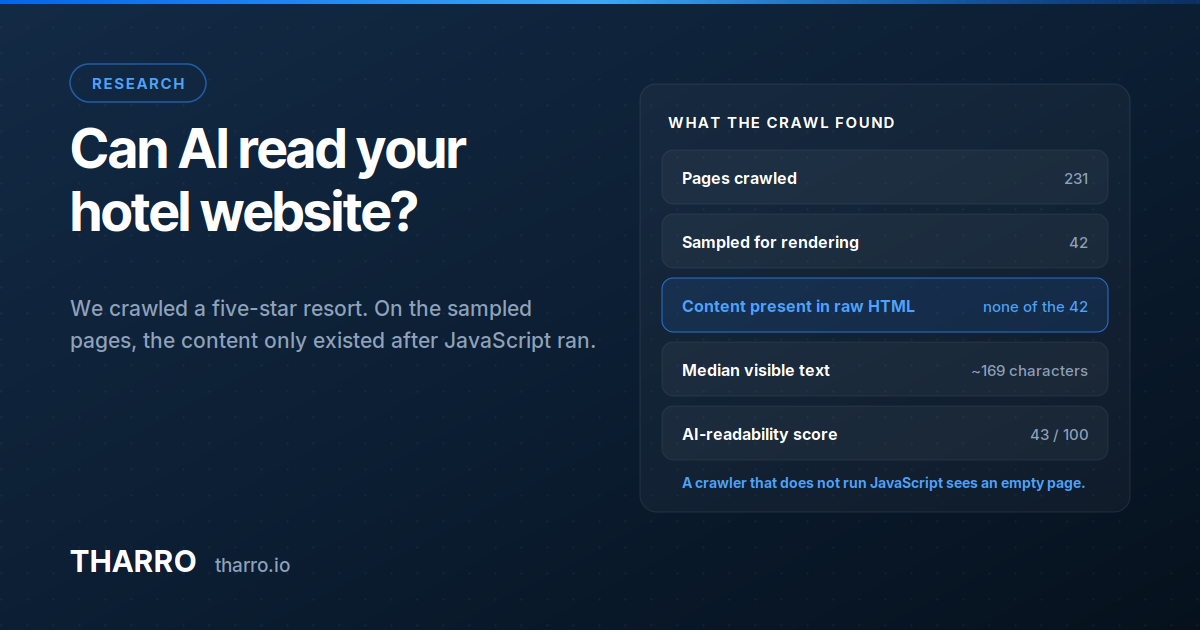
We crawled a five-star resort's site the way an AI assistant does. On the sampled pages, none of the content existed in the raw HTML.

Every conversation about AI visibility starts with content. Almost none of them start with whether the machine can see the content at all.
There is a step before "what does ChatGPT say about my hotel" that almost nobody checks: whether the assistant can read your website in the first place. It sounds too basic to be a real problem. It isn't.
We ran a full technical crawl of a five-star Mediterranean resort — a property with a serious marketing budget, a recently rebuilt site, and a design agency on retainer. 231 pages. Here is what came back.
The finding
Of the pages sampled for rendering behaviour, not one contained its content in the raw HTML. The words were there for a human with a browser. For anything fetching the page and reading the response — no JavaScript, no rendering engine — the pages were effectively blank.
The median page carried under 200 characters of visible text in the raw response. That is roughly the length of this paragraph. Not the length of a room description, a spa page, or a location guide — the entire page.
The site scored 43 out of 100 on AI readability. Its conventional Google score was 73. That gap is the whole story: Google has been rendering JavaScript for years and mostly copes. The newer crawlers are a different question.
Why this happens to good websites
This is not negligence. It is the default outcome of how modern hotel sites get built.
A React or Vue front end, a headless CMS, content loaded client-side after the shell arrives — this is standard practice, it produces fast and beautiful sites, and it is what most agencies will build you in 2026. Nobody involved made a mistake. The site works perfectly for the audience it was tested against: humans, in browsers.
The problem is that the audience changed and the test didn't. When a hotel's marketing team reviews a new site, they open it. They never fetch it.
What actually reads your site now
Three different things visit your pages, and they are not equally capable:
Googlebot renders JavaScript. It has for years. It is slower and less reliable at it than people assume — rendering happens in a second pass that can lag by days — but it mostly works. This is why the problem stays invisible: your Google rankings look fine.
AI crawlers — the bots that build and refresh the corpora behind assistant answers — are far more conservative. Rendering JavaScript at web scale is expensive, and several of these crawlers simply don't. What they store is what arrives in the initial response.
Live retrieval — the fetch an assistant performs mid-answer, when it goes and looks at a page to answer a question about you right now — is the most time-constrained of the three. It is also the one that matters most, because it is the moment your own site could be the source instead of an OTA.
If your content only exists after JavaScript runs, you are betting your AI visibility on the most expensive path being taken every time.
The consequence you can measure
Here is the part that connects to revenue rather than to engineering.
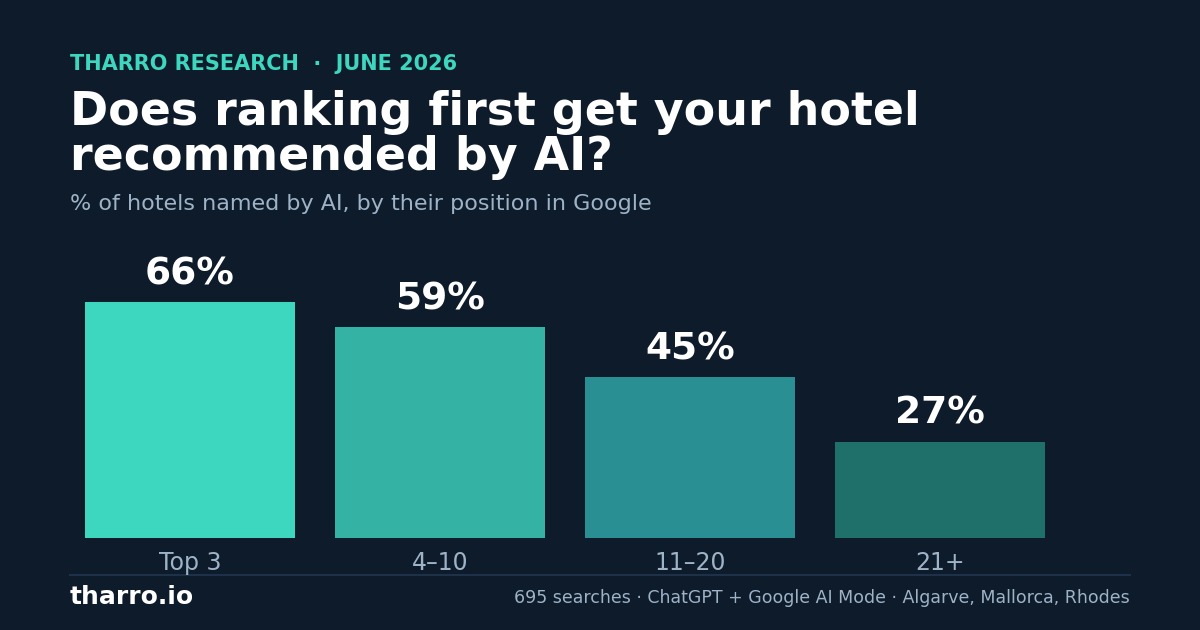
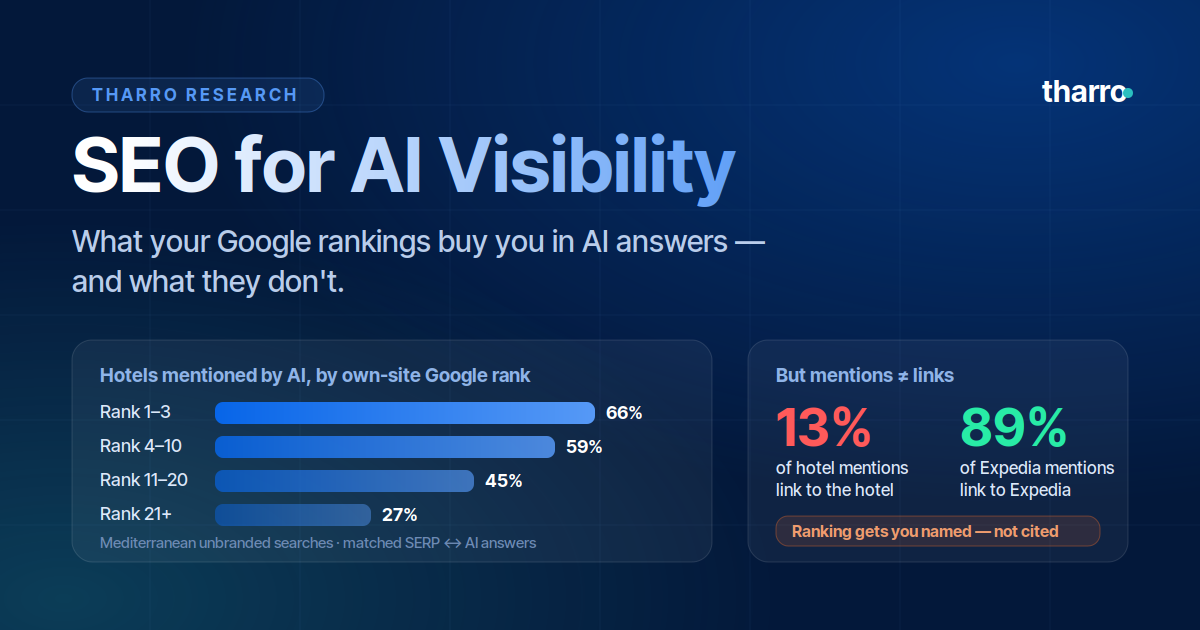
When an assistant recommends a hotel, it cites a source. Our research across AI hotel recommendations found that a hotel's own website is the cited source in under 10% of cases — OTAs, review platforms and editorial sites take the rest. That gap has several causes, but an unreadable website guarantees it. A page with no text in the response has nothing to cite.
So the model still recommends you. It just credits Booking.com for knowing about you.
How to check your own site in five minutes
You don't need a tool for the first pass.
- Open a terminal and run
curl -s https://yourhotel.com/rooms | wc -c— or ask anyone technical to. You get the size of the raw response. - Then run
curl -s https://yourhotel.com/roomsand read it. Look for your actual room descriptions. If you see a<div id="root"></div>and a pile of script tags, that's the finding. - Repeat on the pages that carry your commercial argument: rooms, restaurants, spa, location, offers.
If the words are missing, you have the same problem the resort above had. If they're there, you can stop worrying about this and go back to the content itself.
What to do about it
The fix is architectural, and the size of it depends on your stack.
Server-side render, or pre-render, the pages that carry meaning. Next.js, Nuxt and most modern frameworks do this natively — it is often a configuration change rather than a rebuild. The target is simple: the words a traveller would read should be present in the raw response.
Don't hide content behind interaction. Accordions, tabs and "read more" toggles are fine visually, but the text has to be in the markup, not injected on click. Visually hidden is fine. Absent is not.
Give every page real prose. A room page with a gallery, a price and four bullet points has nothing for a model to work with, even when it renders perfectly. Under 200 characters is under 200 characters either way.
Then check the other languages. In this crawl, 452 of 453 URLs served English content — a multilingual property whose translated pages were, to a crawler, duplicates of the English ones. Worth a separate look.
The uncomfortable part
Most hotels investing in AI visibility right now are working on the content layer: better descriptions, richer FAQs, structured data, listing consistency. All of that is correct and all of it matters.
None of it survives a page that arrives empty.
This is the cheapest problem in AI visibility to find and one of the more expensive to leave. It costs one command to detect. It costs a redesign to discover late.
FAQ
Does Google penalise JavaScript-rendered sites? No. Googlebot renders JavaScript and will usually index the content. The exposure is with the newer AI crawlers, several of which do not render — and with live retrieval, which is time-constrained.
Is server-side rendering the only fix? No. Static generation, pre-rendering and hybrid approaches all produce content in the raw HTML. What matters is the output, not the technique.
How do I know which AI crawlers visit my site? Your server logs. Look for the published user agents of the major AI crawlers, and check whether they are being served content or an empty shell.
Can structured data compensate for unrendered content? Partially. Schema.org markup in the initial HTML is readable and does help. It is a summary of your page, not a substitute for it.
We're on a website builder — is this even fixable? Usually yes, and often it isn't a problem at all: most hosted builders output server-rendered HTML by default. Run the curl check before assuming either way.
Want to know how your site reads to an AI crawler — and how you appear in AI answers because of it? See how Tharro measures AI visibility or book a 30-minute call.